
the cabin game How Turns Actually Work
Draw Slot, Graveyard, the rotating pedestal, and why looking before you take is part of the game.
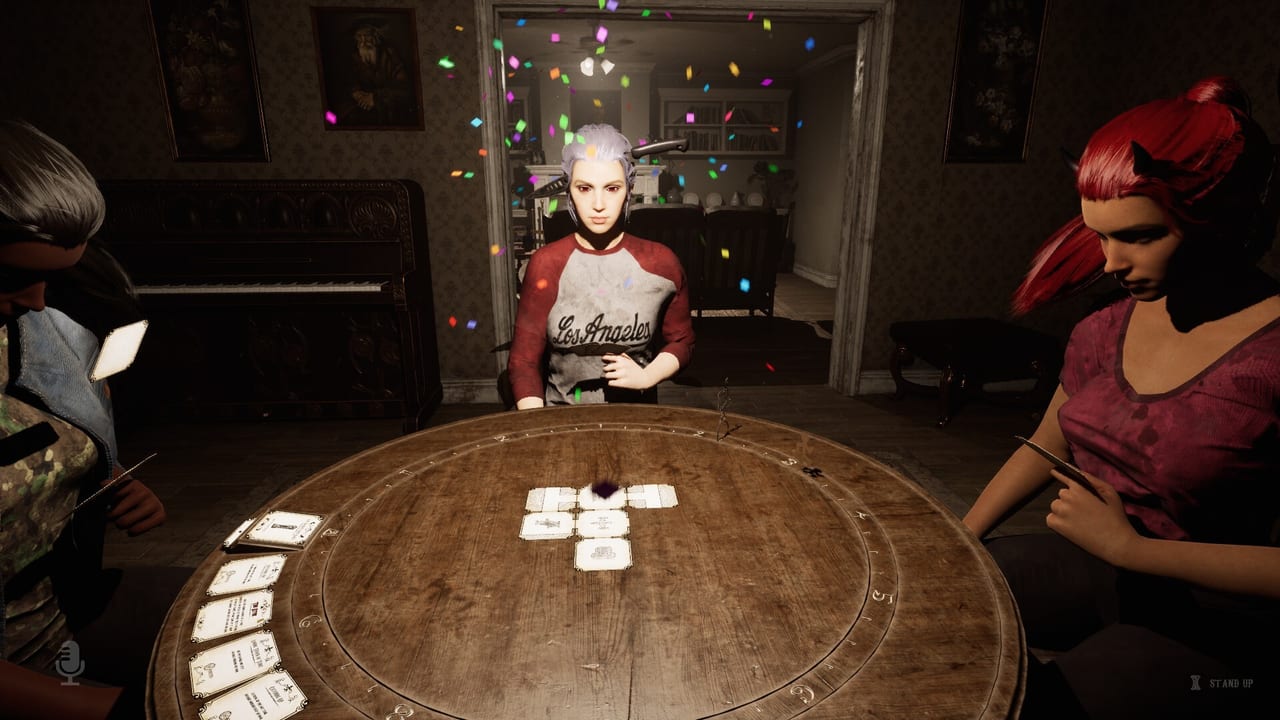
The round table is the cockpit of the cabin game. Before you can investigate, survive events, or escape, you need to understand how the Draw Slot, the Graveyard, and the rotating pedestal work together across each turn. This page is the mechanics layer that the walkthrough and card type pages assume you know. Read it before you sit down for the first time.
the cabin game entered Early Access on 27 August 2026. 1–4 players, solo or online co-op, Steam Windows, $11.99 USD, 30+ cards, 12 monsters, English-only in-game with localization planned. Every player needs to be seated before a turn can begin.
The rotating card pedestal
The centerpiece of the table is a rotating holder that faces whichever player is active. Think of it as the Card Pedestal. It has two important areas:
- Draw Slot — the top position where your new card appears at the start of your turn.
- Graveyard — the upper surface where Clue Cards can be placed and later retrieved.
The table rotates at the end of each turn so the pedestal faces the next player. In solo, it keeps rotating and eventually comes back to you. Everyone contributes to the same shared clock position; the pedestal rotation is about whose decision comes next, not separate progress tracks.
Starting your turn
When the game is ready and the Card Pedestal is facing you, press T to start your turn. The Draw Slot will show your new card. The Graveyard surface will show any Clue Cards currently stacked there.
Your first decision is a binary choice:
- Take the new card from the Draw Slot.
- Take a Clue Card from the Graveyard.
You do not take both. This is the most common source of first-session confusion — new players assume the Graveyard is a discard pile they can draw from in addition to their new card. It is not.
Inspecting the Graveyard before you choose
Click the Graveyard to look through available Clue Cards without committing to take one. Select a card to examine it more closely. You can then choose Accept to take it into your hand or Cancel to go back. Simply looking through the Graveyard does not force you to take a Clue Card.
This inspection step matters because the topmost Clue Card in the Graveyard is the currently active clue. Cards underneath are not being checked. If you remove the top clue, the card underneath becomes the new active clue. That is why you should pay attention to Graveyard order, not just presence.
See the Graveyard page for the full logic of clue stacking, active clues, and graveyard wipe events.
Playing cards from your hand
After taking your card, you can look through your hand and decide what to do. Hover over cards to inspect them. Left Click to examine a card more closely. Right Click to return it to your hand if you have not committed yet.
Once you have chosen a card, follow the instructions for that card type:
- Room Cards: select the card, enter the placement view, use R to rotate, Scroll Wheel to zoom, Left Click to place when the game shows a valid doorway connection.
- Event Cards: accepting the card immediately begins the Event. You STAND UP and the minigame starts.
- Clue Cards: placing one in the Graveyard activates that clue for investigation. Walk the rooms to find it.
- Other card types: follow the on-screen prompt.
The commitment rule
Once you choose a Room Card to play, you are committed to that card. You can rotate and reposition the room while searching for a valid location, but you cannot cancel the action and return to your hand to choose a different Room Card. The game will either let you place it or not — there is no backing out.
Because of this, look at the existing cabin layout before committing to a room. You do not have complete freedom to inspect the entire cabin while choosing a card from your hand. Planning ahead prevents awkward placements that create dead ends.
Turn structure summary
- Press T to start your turn.
- Look at the Draw Slot (new card) and the Graveyard (available Clue Cards).
- Decide: take the new card or take a Clue Card from the Graveyard.
- Inspect your hand. Left Click to examine, Right Click to return to hand.
- Play the card you chose. Follow its type rules.
- If an Event Card fires, STAND UP and complete the minigame.
- If a Room Card was placed, STAND UP to explore the new space.
- Sit back down. The pedestal rotates to the next player.
Co-op table habits
In multiplayer, one player should watch the clock track while others are in the rooms. The table caller also reads the M tips if the group is stuck on what a card does. Do not all stand up at once — if nobody is at the table, the monster pawn is a silent fail state you cannot see from the hallway.
Before the game starts, decide who calls the clock and who searches. That split is on the Co-op page. The table job list is the same whether you are solo or four players: start the turn, choose wisely, play the card, sit back down.
What to read next
- Graveyard — clue stacking, the active clue, and graveyard wipe
- Card Types — what each card job actually does
- Getting Started — the first session briefing
- Co-op — table jobs for multiplayer
Frequently Asked Questions
Quick answers about cards, clues, monsters, and escaping the cabin.
Can I draw both the new card and a Clue Card from the Graveyard?
No. You choose one or the other at the start of your turn. The Graveyard is not a bonus draw — it is an alternative to the Draw Slot.
How does the rotating pedestal work?
The Card Pedestal faces whichever player is active. After your turn ends, the outside portion of the table rotates so the pedestal faces the next player. In solo it keeps rotating back to you.
What happens if I choose a Room Card and cannot find a valid spot?
You cannot cancel after choosing a Room Card. If you cannot find a valid doorway connection, you may be stuck with an unplaceable card. Look at the cabin layout before you commit.
Is the Graveyard a discard pile?
No. Clue Cards placed in the Graveyard are not discarded — they are active and can be retrieved. The topmost card is the currently checked clue. Cards underneath are not yet active.
Can I look at the Graveyard without taking a card?
Yes. Click the Graveyard to inspect available Clue Cards. Select one to examine more closely, then choose Accept or Cancel. Looking does not force you to take it.
Do I have to start my turn manually?
Yes. Press T when the pedestal faces you and the game is ready. Everyone needs to be seated first. If someone cannot start their turn, verify game files — that freeze was a version mismatch in early builds.